Pages

Showing posts with label Membership. Show all posts

25 June, 2021

Sitecore Upgrade - Transferred Sitecore Membership User Password does not work - Possible Reasons

In case if you have migrated the password using Sitecore utility as mentioned here, your migrated password may not work. Some of the steps which are mentioned below may help. 

  1. Check whether the script ran successfully on the current server
    You may need to confirm whether the source and destination server used to migrate the password is correct and also whether the destination server has all the users and password. 

  2. Check the Membership Password hashAlgorithmType
    You may need to check whether the hashAlgorithmType is same in the source and the destination Sitecore instance. You can view it in the web.config file in <membership> node. Attribute name is hashAlgorithmType. For the migrated password to work, destination hashAlgorithmType should be same as source hashAlgorithmType. 

  3. Migration to Sitecore 9.2 with Identity Provider
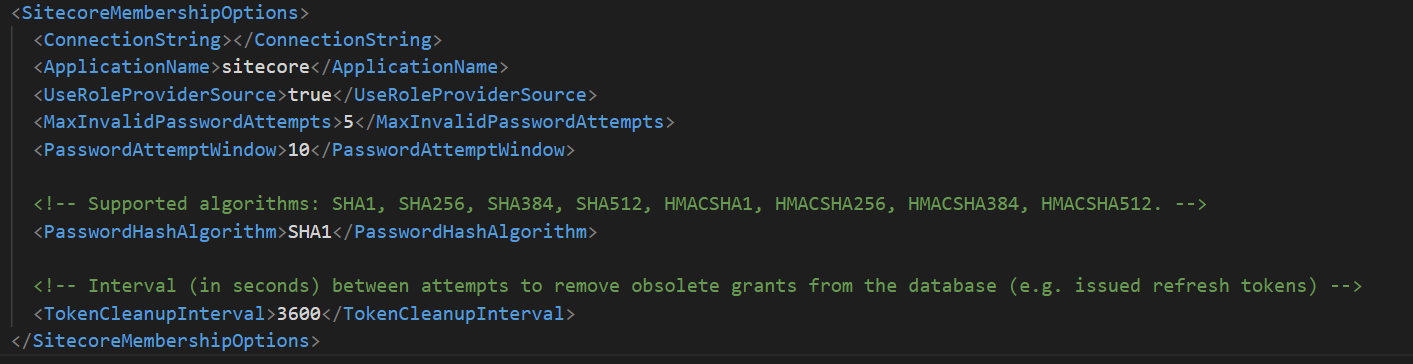
    In case if the destination server is going to use Siteore Identity Provider to authenticate the Sitecore membership users, then you will need to set the same hashAlgorithmType in Identity server configuration. 

    In the Sitecore ID server, go to \sitecore\Sitecore.Plugin.IdentityServer\Config\identityServer.xml file and set the same hashAlgorithmType which is used in source server in <PasswordHashAlgorithm> tag. Do not forget to recycle the Identity server application pool after this change. 

Sitecore Upgrade - Transfer Sitecore Membership User/Roles and Password

As part of the Sitecore upgrade, if you have a requirement to transfer Sitecore Membership roles, users and their password, then you can follow this process. 

In case if you have upgraded the core database from one Sitecore version to another, you may not be able to use the same password unless you reset it. 

Transfer Users and Roles using Sitecore Package
To transfer the users and roles, you can use Sitecore Package or by serializing user accounts on one instance and de-serializing them on another instance or easiest way is it to use Sitecore PowerShell Extension. Below piece of script will get all the users and roles from the current version and provide a package.

Once the package is ready, you can use Sitecore Package Installer to install and click Continue Always if there is an user or role already available in the destination server, you can click Continue Always to proceed. 

Transfer Password to new environment
Bringing the users and roles to the new environment will not bring the password. It may be necessary to manually reset user passwords after the transfer. Sitecore provided a simple utility to transfer the passwords to the destination server. Sitecore KB

You have to place the admin web page, provide the source and destination core or security db connection string. You will get an option to select the users to migrate their passwords. In the Sitecore provided file, you have to select one user at a time to move from left to right. 

I modified to add a button to transfer all the available user's passwords in a single click of a button (Transfer All). You can get the updated file here in GitHub

Note: In order for the tool to list the users, you need to make sure the users are already transferred to the destination Sitecore instance. 


blockquote { margin: 0; } blockquote p { padding: 15px; background: #eee; border-radius: 5px; } blockquote p::before { content: '\201C'; } blockquote p::after { content: '\201D'; }