Pages

12 June, 2014

Sitecore CMS – Log Rotator Job

I have created a Sitecore Job to compress the Sitecore logs and move it to a separate folder.
  • Download the package here.
  • Install it using Sitecore Installation Wizard.
  • Create a folder in the Data Folder with name ‘rotatedLogs’. You can change this option ‘LogRotatorFolder’ in the SitecoreLogRotator.config after the package installation.
  • Minimum number of logs to keep in actual log folder can be configured in the above configuration. 
  • You can change the frequency of Sitecore Job as per this article.


04 April, 2014

Sitecore: Site resolver issue with similar domains

I faced an issue with Sitecore Site resolver with similar domain (hostName).

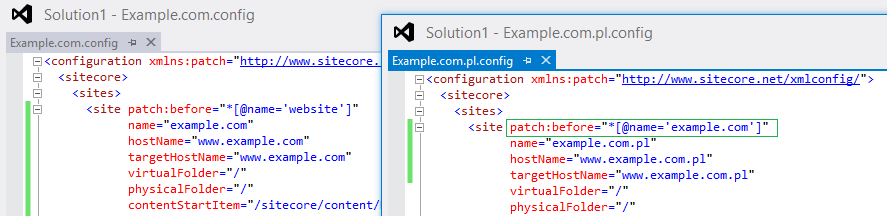
If there are two different websites with similar domain (www.example.com and www.example.com.pl), Sitecore resolves the site based on the order of site node in the web.config (or SiteConfiguration.config in includes folder).

Configuration: (Not Working)
Order 1: <site hostName=”www.example.com” …
Order 2: <site hostName=”www.example.com.pl” …

Sitecore resolves to www.example.com even though we browse www.example.com.pl.
--------------------------------
Configuration: (Working)
Order 1: <site hostName=”www.example.com.pl” …
Order 2: <site hostName=”www.example.com” …

Here, order has been changed to COM.PL first and Sitecore resolves properly for both the domains – www.example.com, www.example.com.pl


Is it a Sitecore site resolver issue or is it an expected behavior?

Sitecore support ticket has been created – 408068. Waiting for their inputs…
J


Sitecore: Reset Sitecore admin account password to default

Sitecore administrator might have forgotten the admin password.
If you would like to reset it to default, you can follow the below steps. Password will be reset to ‘b’.

In Sitecore Core DB, you can run this attached SQL script and this will reset the password to ‘b’.


Hope this helps!!! 
blockquote { margin: 0; } blockquote p { padding: 15px; background: #eee; border-radius: 5px; } blockquote p::before { content: '\201C'; } blockquote p::after { content: '\201D'; }