Pages

12 November, 2012

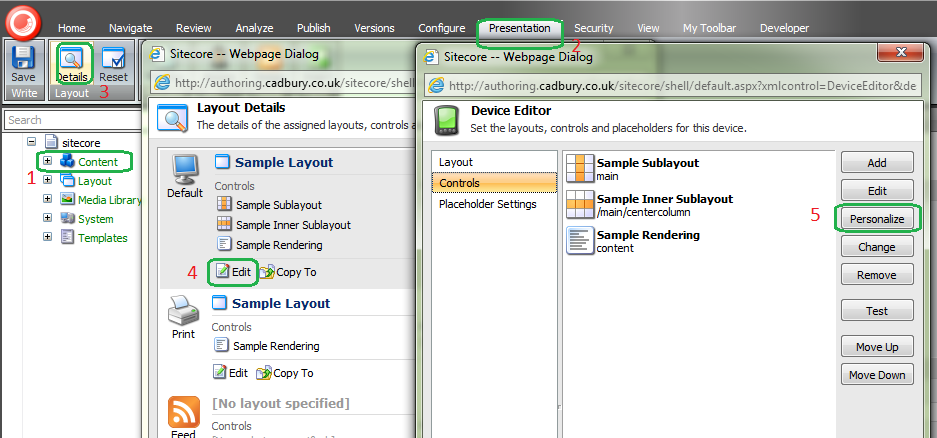
Personalize button is missing in Sitecore > Presentation > Details tab in Sitecore


Personalization and Analytics in Sitecore are interrelated. If we disable the analytics, all the personalization related stuff also gets hidden from the content tree.

If we disable analytics, we will not get the personalize button in the pop up.


If we enable analytics, we will get the option of adding rules using personalize button.  


Enable the Analytics in Sitecore.Analytics.config in Includes/App_Config folder.
      <setting name="Analytics.Enabled" value="true" />

03 November, 2012

Find the list of Sitecore Admin Users (through database)

If you want to list down the users who have Sitecore admin access, you have to go through each user (to check IsAdministrator checkbox is checked or not) in User Manager in Security tools. We can also find the list by querying Sitecore ASP.Net membership tables. Mostly these table will be located in Sitecore Core database.

Query:

/**  Getting the list of Users who have Sitecore admin access **/
SELECT [ApplicationId]
      ,[UserId]
      ,[UserName]
      ,[LoweredUserName]
      ,[MobileAlias]
      ,[IsAnonymous]
      ,[LastActivityDate]
  FROM [NewInstance1Sitecore_Core].[dbo].[aspnet_Users]
  WHERE UserId IN
  /** Getting the list of user-ids **/
  (SELECT [UserId]
  FROM [NewInstance1Sitecore_Core].[dbo].[aspnet_Profile]
  WHERE
  /** IsAdministrator Property Name Check **/
  [PropertyNames] LIKE '%IsAdministrator%'
  AND
  /** Property Value : True or False Check **/
  /** !Important: This check should be avoided when you have other boolean type
            custom profile property. And in that case, just get the User name
without this check and manually check in User Manager **/
  (PropertyValuesString LIKE '%True%' AND PropertyValuesString NOT LIKE '%False%'))

This query will return the user details who have admin access.

Note: If you have any custom Boolean type profile property, you may need to avoid using the PropertyValuesString values check in the query. 

22 July, 2012

Sitecore: Disable Sitecore cache and browser cache while developing to save time


It is always to have cache in any web application. But while in development stage, it is better to disable Sitecore cache and also browser cache to avoid wasting time in recycling application pool or clearing cache from cache admin. To disable it,

      <!--  CACHING ENABLED
            Determines if caching should be enabled at all
            Specify 'true' to enable caching and 'false' to disable all caching
      -->
      <setting name="Caching.Enabled" value="true" />
      <!--  DISABLE BROWSER CACHING
            If true, all pages will have:
              Cache-Control: no-cache, no-store
              Pragma: no-cache
            in the http header
      -->
      <setting name="DisableBrowserCaching" value="true" />

Both the setting should be true; former to avoid Sitecore cache and latter to BrowserCache.
blockquote { margin: 0; } blockquote p { padding: 15px; background: #eee; border-radius: 5px; } blockquote p::before { content: '\201C'; } blockquote p::after { content: '\201D'; }