Pages

29 June, 2014

Sitecore Task Initiator - A simple module to initiate the scheduled task

This module helps Sitecore Administrator to initiate the scheduled tasks configured in the content tree. The module has a Sitecore Scheduled Job admin page and a Sitecore Role. Admin page will list down all the tasks in the content tree with a button to initiate the task. Sitecore role is for the Sitecore administrator who can add a user to this role by which user can initiate the Task.

Installation:
Use Sitecore Installation Wizard to install the package which contains an admin page and a Sitecore role. Download Link.

How to access the page:
Authorized user can access the page using the below url.
http://domain/sitecore/admin/jobs.aspx

How to authorize a non-admin user:
All administrator can access the page without any role. For a non-admin user, an administrator can add them to the role - Sitecore Task Initiator. This role will allow the non-admin user to access the page and initiate the task.
Note: This role will not give any access to other admin pages.

Email:
An email will be sent to the list of configured administrators with the task details and initiation time. Administrator can configure the email details in the jobs.aspx page.
MAIL_FROM = "ScheduledJob@SitecoreSharedSource.com";
MAIL_TO = "";
MAIL_CC = "";

In version 2.0, I am planning to add the below functionality.
- Logs for the tasks can be obtained in admin page.
- Logs will be sent to the initiator and the admin.



12 June, 2014

Sitecore CMS – Log Rotator Job

I have created a Sitecore Job to compress the Sitecore logs and move it to a separate folder.
  • Download the package here.
  • Install it using Sitecore Installation Wizard.
  • Create a folder in the Data Folder with name ‘rotatedLogs’. You can change this option ‘LogRotatorFolder’ in the SitecoreLogRotator.config after the package installation.
  • Minimum number of logs to keep in actual log folder can be configured in the above configuration. 
  • You can change the frequency of Sitecore Job as per this article.


04 April, 2014

Sitecore: Site resolver issue with similar domains

I faced an issue with Sitecore Site resolver with similar domain (hostName).

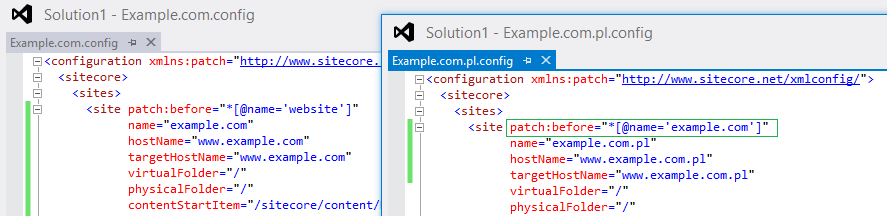
If there are two different websites with similar domain (www.example.com and www.example.com.pl), Sitecore resolves the site based on the order of site node in the web.config (or SiteConfiguration.config in includes folder).

Configuration: (Not Working)
Order 1: <site hostName=”www.example.com” …
Order 2: <site hostName=”www.example.com.pl” …

Sitecore resolves to www.example.com even though we browse www.example.com.pl.
--------------------------------
Configuration: (Working)
Order 1: <site hostName=”www.example.com.pl” …
Order 2: <site hostName=”www.example.com” …

Here, order has been changed to COM.PL first and Sitecore resolves properly for both the domains – www.example.com, www.example.com.pl


Is it a Sitecore site resolver issue or is it an expected behavior?

Sitecore support ticket has been created – 408068. Waiting for their inputs…
J


blockquote { margin: 0; } blockquote p { padding: 15px; background: #eee; border-radius: 5px; } blockquote p::before { content: '\201C'; } blockquote p::after { content: '\201D'; }